
GRIP FAQs
GRIP Genealogy Institute Virtual Information
What will the GRIP Genealogy Institute virtual format be like?
The Virtual format is an interactive classroom using Zoom for class and Dropbox for material distribution. This format allows students and faculty to interact with one another throughout the course. Attendees can see, speak, hear, and share screens with each other and the faculty members.
What will the class schedule be for Virtual Week?
GRIP Virtual Week will be 22 – 26 June 2026.
Sunday, 21 June 2026:
Optional welcome and orientation program. Meet your Coordinator and faculty members, your Grip Guide, hear about the schedule for the week, and any news. Stick around for some fun and door prizes opportunities for those who attend. Time to be announced.
Optional Evening Sessions:
Optional evening sessions will be held on Monday, Tuesday, Wednesday, and Thursday at 7:00 PM EST. These include speakers from the genealogical industry and a variety of topics to enhance your educational week.
Course Schedule:
Please see the specific course schedule for class sessions and times.
updated: 03 February 2026
What technology do I need to attend the GRIP Virtual Institute?
- We recommend a laptop or desktop computer for the best functionality and participation in the course. Mobile devices (tablets and phones) are acceptable but do not allow the maximum participation and capabilities of the programs.
- An internet connection – broadband wired or wireless (3g or 4G/LTE minimum)
- Speakers and a microphone – these can be built into your computer system or external as a USB plug-in or wireless Bluetooth. (Microphone is required for classroom participation)
- A webcam so you can turn on your camera and participate in class discussions.
- Zoom desktop client or Mobile app.
What if I am unsure how to use Zoom or Dropbox?
We will provide instructions and basic training to the attendees on how to use the Zoom application and how to download materials such as the syllabus from the Dropbox. This training will be scheduled about two weeks prior to the start of the course.
How do I attend and sign on for each day's sessions?
As a registered attendee, you will receive Zoom links and special log-in instructions for the entire week, one week before the course begins. Within your Dropbox provided one week before the account, you will receive a “Link Sheet” with all links necessary for your week.
You will log in to Zoom using the link each day. The tech host will admit registered students, so be sure your name in Zoom matches the name you registered with.
Will there be recordings of each session in case I am unable to attend or lose connection?
YES! We will have each virtual session available in a recorded view-only version. These recordings will be posted the day after the class session and will be available for 14 days after the end of the course. The recordings will be view-only, not downloadable, and available only to registered attendees.
In-person sessions are not recorded.
Updated: 13 Jan 2026
GRIP Genealogy Institute In-person Information
What is the in-person format like?
The in-person courses will be held at the University of Pittsburgh in Pennsylvania. The sessions will be held in a “traditional classroom” setting and will not be recorded.
Updated: 07 Nov 2024
What will the class schedule be for In-Person Week?
GRIP In Person Week will be 12 – 17 July 2026.
Sunday, 12 July 2026:
Check-in for all registered students and faculty. Welcome program and dinner. Times to be announced.
Course Schedule:
Please see the specific course schedule for class sessions and times.
Updated: 03 February 2026
What technology do I need to attend in-person?
- Students will want access to the syllabus while they are in class. This can be on a laptop or tablet. Optionally, students may print the syllabus for use in class. GRIP will provide a digital copy of the course materials to all students with a license to print one copy for use in class. GRIP does not provide printed course materials.
- Participants may want a laptop or tablet to participate in the course.
- The University has Wi-Fi connections, but students can bring a hotspot in case of bandwidth.
- Dropbox app or account – You do not have to pay for an account.
Updated: 05 Aug 2024
What if I am unsure how to use Dropbox?
You will be invited to the Student Dropbox folder one week prior to the start of the course. There you will find your PDF copy of the syllabus, additional materials (if any) provided by instructors, and your Links Sheet for all links and access to the course for the week. You do not need a paid Dropbox account to use this, but you do need at least a free Dropbox account to use this feature.
You will receive basic instructions on how to view and download from Dropbox for your course. The NGS and GRIP Staff are not responsible for instruction or technical support on Dropbox; its use is optional. Your access to the Student Dropbox will end 30 days after the course closes.
Updated: 13 Jan 2026
How do I get to Pittsburgh?
If you are flying in, the closest airport is Pittsburgh International Airport https://flypittsburgh.com/
More details to come.
Updated: 05 Aug 2024
Where do I stay each night in Pittsburgh?
Students may stay in the dorm rooms at a reasonable rate for all attendees and faculty. Pricing will be provided at registration. The dorm rooms are 3-person rooms, with one single bedroom, one double bedroom (all twin-size beds), and one shared bath. More can be viewed about the dorm rooms here: Ruskin Hall
If dorm life is not for you, we will send out information to registered students regarding a contracted GRIP rate at nearby hotels as soon as arrangements are finalized.
Note
Dorm accommodations may change from year to year depending on housing availability at the University.
Faculty and students who reside in the dorms during the week must clean up and check out of their dorm rooms no later than 1:00 PM on Friday.
updated: 03 Feb 2026
Are meals provided?
All students and faculty are invited to the Welcome dinner on Sunday night, hosted by GRIP and NGS at no charge. (We will email you for RSVP’s) – So plan your travel accordingly.
Meals and snacks are not included in the program and are the responsibility of each participant. There is a cafeteria on campus offering a variety of options, as well as several local restaurants conveniently located on the main street near the University of Pittsburgh. All students are welcome to dine in the campus cafeteria. We recommend budgeting approximately $30–$40 per day for meals, depending on your preferences and selections.
Information on “The Eatery” can be found here: https://www.theeateryatpitt.com/
Updated: 13 January 2026
Are special dietary requirements available in the University Cafeteria? (Gluten Free, Dairy Free, Kosher)
A variety of selections are available throughout Pitt, including Food trucks and the dining hall. In the dining hall, there are several options. Please review the options here: University of Pittsburgh—Dining options.
In addition, there are several restaurants and eateries nearby that might tickle your fancy.
Updated: 23 Jan 2025
Course Detail
Are there Prerequisites for any of the courses?
Yes, some courses will have prerequisites. If a course has prerequisites this will be listed on the course detail page for each course.
What is the difference between a prerequisite, requirement, or recommendation?
In the course detail pages your course may list a prerequisite, requirement, or recommendation for the course. These parameters are set by the Course Coordinators and faculty members to assure you the greatest success in the course.
- A prerequisite is a course, education, or experience that should be completed before enrolling in the course.
- A requirement is a software, books, research papers, or details from your personal experience that you will need to complete class work.
- A recommendation is a suggestion from your faculty to enhance your experience in the course: possible experience, reading, or materials to obtain prior to class.
How do I get my Syllabus for the Course?
A link to the Dropbox folder containing your syllabus and other materials will be provided to you via email one week prior to the start of your course.
Can I print or share the syllabus?
You may not share the syllabus as they are protected by copyright. Your enrollment in the course allows you to print one copy of the syllabus for personal use only.
Can I download the recordings?
No; access to recordings is limited to streaming only, due to copyright and contract restrictions. Recordings are only completed for the virtual sessions.
Will I receive a certificate?
Yes! Upon successful completion of the course.
Virtual attendees will receive their certificates within two weeks of the end of the course; In-Person attendees will receive their certificates in class on the last day of the course.
Updated: 13 Jan 2026
Registration Process and Payments
When is Registration?
Registration for 2026 Courses will be 05 Feb 2026.
- all course registration will begin at 1 PM Eastern Standard Time
updated: 13 Jan 2026
What should I expect at registration?
To make your experience as easy as possible – we encourage you to sign in or create a free account with the National Genealogical Society before registration day at https://www.ngsgenealogy.org/
If you already have an NGS account, test your account beforehand to ensure it is current with password, contact information, and details.
If you do not have an NGS account, create one using the below steps.
In creating or updating your account, you will be able to provide important personal information for communications and details to help us ensure you stay in the loop on all things NGS and GRIP. We will use this information to communicate with you about your registration, waitlist, or anything else ordered through the system.
After creating your account, you will be ready for registration for your selected course.
Step 1. Go to the website: https://www.ngsgenealogy.org/
Step 2: Select “Login” from the top of the page.
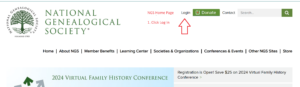
Step 3: Sign into your account using your NGS credentials or Create a free account by clicking the link in the image.
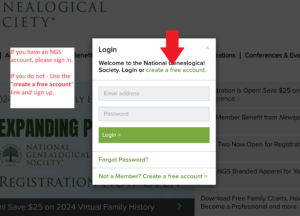
Step 4: Go to the GRIP website for course listings at https://grip.ngsgenealogy.org/
Step 5: At the time registration opens, a registration button will appear on the Main Course Page (*Note: if you do not see the registration button, please refresh your page or clear your cache and try again)
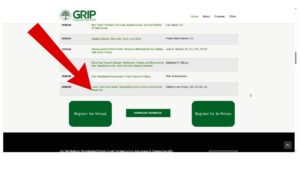
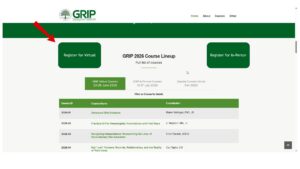

Step 6: Click the registration button. This will redirect you to the “menu” on your NGS account page – allowing you to move through the steps to register for your course and any add-ons you wish.
Step 7: Complete your registration selection; payment will be requested at the time of reservation. All prices should reflect any discount applied. There is no need for “codes”.
Should you have any questions, please reach out to Grip@ngsgenealogy.org
updated 15 Feb 2024
I plan on staying in the dorms in July, how are room reservations handled?
You will select your dorm preference when registering.
Updated: 07 Nov 2024
Tuition Expenses – How much is tuition for GRIP?
Tuition for GRIP Genealogy Institute courses in 2026 varies by course and NGS membership status. For complete and up-to-date tuition information, please visit each course’s individual page.
- The NGS member discount applies only to tuition.
- NGS members automatically receive the tuition discount.
- Please click here to join or renew your membership with the National Genealogical Society.
If you have any questions about your NGS membership, please contact the NGS office at 703-525-0050.
updated: 03 Feb 2026
What if the course I want is full?
If a course is full, you may join the waiting list. You will be notified if space becomes available in the course.
What should I do if I need to cancel my enrollment in a course?
If you find it necessary to cancel your registration in a course, please reach out to grip@ngsgenealogy.org
The NGS Customer Service team will review and process your request within three business days. If the cancellation is made before the deadline, a refund, less a $100 administrative fee, will be provided. You will be credited using the payment method used during registration.
Cancellation Deadlines:
GRIP Virtual Week 2026 – Deadline May 01, 2026, 11:59 PM EST
GRIP In Person Week 2026 – Deadline May 29, 2026, 11:59 PM EST
Cancellation of a course on the same day your registration was completed does not incur any administrative fees.
Updated: 03 Feb 2026
Are there scholarships available?
YES! NGS offers the Donn Devine Scholarship, awarded to one applicant each year. See details here
There are other scholarships available in the genealogical community that may be used at the institute of your choice. Due dates vary, please review the provided websites for details.
American Society of Genealogists Scholar Award
Board for Certification of Genealogists® Sluby Scholarship for African American Students
My Society or Library is an NGS member. Can I get a member discount?
At this time Member discounts are for individual or household members of NGS, not organizations.
General Questions
How long is GRIP?
Each course runs for four and a half days, with eighteen 75-minute class sessions.
Some courses will include additional enhancement sessions for 30 minutes before or after the regular instruction that are optional to the attendees. These sessions are for homework review and additional topics as set by the faculty.
Some courses that are held in-person may include a repository/archive visit to enhance the experience and learning of the students.
Schedules can be viewed on specific course pages. Final specific schedules (including breaks and lunches) will be provided to weeks prior to course beginning via Dropbox.
Updated: 05 Aug 2024
When will complete course details be posted?
Each year, complete course details will be posted no later than November for the following year. This will include session titles, schedules, instructors, prerequisites (if any), and recommendations or requirements for each course.
Updated: 05 Aug 2024
Can I purchase GRIP Shirts or other items? NEW LINK
YES! We offer various clothing options, including shirts, sweaters, and sweatshirts, available in multiple sizes. Additionally, we have a small selection of other items for you to enjoy. Visit our online store to browse and make your selection. Your purchased items will be sent directly to your doorstep.
For those planning to wear our merchandise during the GRIP week, we recommend placing your order in advance to ensure timely delivery.
Please Note: all items are customized with the GRIP logo at the time of your order and are non-refundable.
CLICK HERE ⇒ for Link to GRIP STORE
Updated: 12 April 2024
Become Part of the GRIP Team
Propose a GRIP Course.
NGS invites proposals for innovative, unique courses to be included in the GRIP Genealogy Institute (GRIP) curriculum. GRIP conducts two sessions annually, one virtually in June and the other in person in July in Pittsburgh, Pennsylvania.
We have a rolling proposal format available. If inspiration strikes, we want to hear about it! The deadlines are listed below if you are proposing for the upcoming education year.
- Deadline for Courses in 2027 – May 15, 2026.
Please access the detailed information and requirements for the call for proposals by downloading the following PDF document (Propose a Course)
Are you new to coordinating, or do you have questions about the process, content, or expectations? Gena Philibert-Ortega and Kristi L. Sexton, the co-managers of GRIP, are happy to help you! Please reach out to us with your questions! GRIP@ngsgenealogy.org
updated: 13 Jan 2026
Can I get involved with GRIP as a volunteer? - CURRENTLY BEING ACCEPTED
Join us in shaping the future of our Institute! We thrive on the dedication and passion of volunteers like you, who help us reach our highest potential. Whether you prefer virtual or in-person opportunities, there’s a role suited just for you. Be a part of our vibrant community as we work together to make a difference. We eagerly anticipate welcoming you aboard!
If you are interested in joining the team, please apply here: GRIP Volunteer Page
(GRIP Guides for tech support are a separate application)
updated: 23 Jan 2025
Want to be a GRIP Guide for virtual week? (Currently closed)
Join us in shaping the future of our Institute! We thrive on the dedication and passion of volunteers like you, who help us achieve our highest potential. Our virtual week is an incredible experience, and we’re seeking seasoned “techies” to join our team. Below is a brief overview of the duties, responsibilities, and schedule. We can’t wait to welcome you aboard!
GRIP Guide Responsibilities:
- Starting Zoom for each weekly class session
- Managing the needs of faculty, including breakout rooms and polls
- Managing closed captioning and session recordings (excluding chat logs)
- Providing light tech assistance to faculty and students
- Making daily announcements (for GRIP and Faculty)
- Take attendance each day using the provided form
- Keeping GRIP leaders informed of any classroom, student, or faculty issues or concerns
Benefits of GRIP Guides:
- Tuition waiver for the course they are assisting with
- Training to become a GRIP Guide
- Assistance and support from GRIP’s Virtual Coordinator
updated: 3 February 2026